Sound Healing / Binaural Beat Generator
Binaura
Two tones. One stillness.
Binaural beats for any track or session. Binaura carries the listener through the brainwave bands, from deep delta to bright gamma, one band at a time.
11 €VAT included
A simple 7.83 Hz binaural beat on the 136.1 Hz OM carrier, made live in your browser. Keep the volume low.
Key features
- Binaural beats from 0.5 to 45 Hz on any carrier from 20 to 1000 Hz
- Gearbox journeys through every brainwave band, with dwell, glide and return
- Schumann 7.83 Hz and Phi beat ladders
- Solfeggio and Cosmic Octave carriers, 174 to 963 Hz
- Isochronic pulse for speakers, noise beds for depth
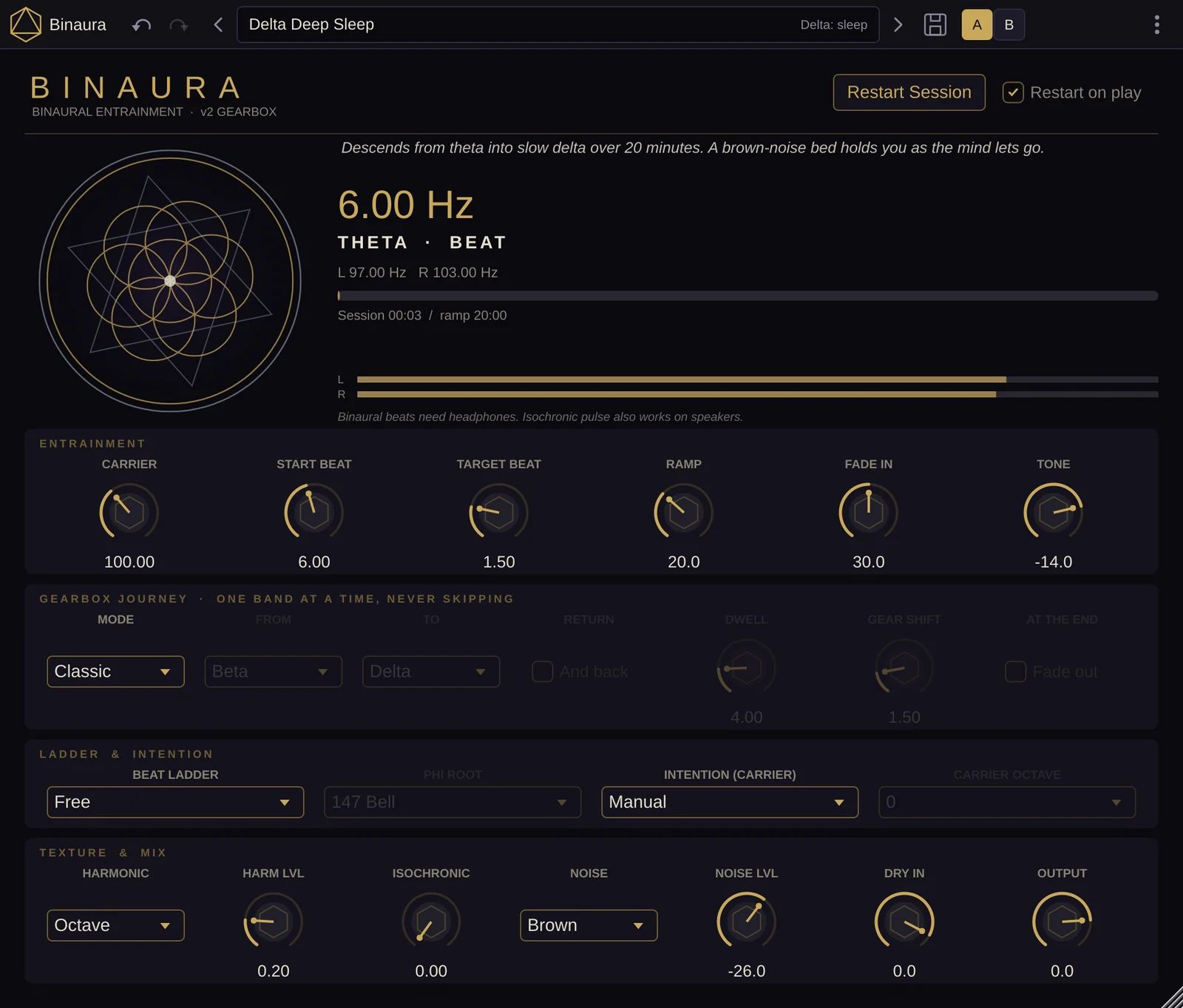
- 27 factory presets, from Delta Deep Sleep to Gamma 40 Hz Clarity
What is Binaura?
Binaura is a binaural beat generator and brainwave entrainment plug-in for macOS (VST3, AU and Standalone) made by Sacred Audio. Binaural beats for any track or session. Binaura carries the listener through the brainwave bands, from deep delta to bright gamma, one band at a time. It costs 11 € including VAT and runs free for 14 days, and is part of the Temple bundle (all four plug-ins for 77 €).
A slightly different tone in each ear, and the mind hears a third: the beat between them. Binaura builds that beat into your track or your session.
Set a start and a target and let the beat glide over an hour, or let Gearbox drive a whole journey through Delta, Theta, Alpha, Beta and Gamma. Lay it under your music, or run it on its own in the Standalone app.
Binaural beats with a glide
Set a carrier from 20 to 1000 Hz and a beat from 0.5 to 45 Hz. The beat can glide from Start Beat to Target Beat over a ramp of up to 60 minutes, then hold.
Gearbox journeys
Choose a start band and an end band, and Binaura travels through every band in between. Set the dwell time in each band, the gear-shift glide, a return trip and a fade to silence at the end.
Schumann and Phi ladders
Snap beats to 7.83 Hz and its octaves, from 1.96 to 31.32 Hz. Or divide a root tone (79.6 Hz organ, 117 Hz coffer, 147 Hz bell or 432 Hz) by phi until it lands in each band.
Solfeggio intentions
Pick the carrier by intention, from 174 Ground and 528 Heart to 963 Unity. Carrier Octave moves it down by one or two octaves for comfortable long listening.
Harmonics, pulse and noise
A second tone pair a fifth, octave or twelfth above reinforces the beat. Isochronic pulse works on speakers, and a pink, brown or ocean noise bed sits underneath.
A calm, live display
The readout shows the beat, the band, the exact frequency in each ear and the journey as a staircase. The mandala moves gently and never flashes at the beat rate.
In the studio
Put Binaura on an empty track under your music, or on a pad with Dry In up, and the beat sits inside the mix. Restart on play starts every playback from the same point, so the beat stays lined up with your arrangement, and every control can be automated. Pick an Intention or set the carrier to a note in your key, drop it an octave or two, and use the isochronic pulse when the track will be heard on speakers.
In the healing room
Load a Gearbox journey in the Standalone app, press Restart Session and let it run. The cue line guides the listener through each band, and Fade out ends the session in silence. Sound Healing Bed lays a quiet OM carrier with a Schumann 7.83 Hz beat under bowls, gongs and voice. Use headphones for binaural beats, or the isochronic pulse for a group in a room, and check the setup first with Pure Test Tone.
How it's built
The modelling, the research and the choices behind Binaura.
How does Binaura make the beat?
Each ear gets a pure sine tone: the left at the carrier minus half the beat, the right at the carrier plus half. The brain hears the difference as a slow pulse. A 200 Hz carrier with a 10 Hz beat plays 195 Hz left and 205 Hz right. The beat glides between values on a smooth logarithmic curve.
Why does a Gearbox journey never skip a band?
The order comes from the entrainment texts in our research library (Neuro Alchemy, Signal Protocol, Harmonic Alchemy): reach a band, settle, then move to the next one. Gearbox steps through every neighbouring band with a dwell time and a glide between them, and the test suite fails any journey that skips one.
The bands are Delta 0.5–3 Hz, Theta 4–7, Alpha 8–12, Beta 13–30 and Gamma above 30. The Schumann ladder is 7.83 Hz and its octaves; the Phi ladder divides a root tone (79.617, 117, 147 or 432 Hz) by φ until it lands in each band.
How do you check it?
Every build renders every preset through the real plug-in. A 200 Hz carrier with a 10 Hz beat must measure 195 and 205 Hz to within 0.05 Hz. A ramp from 6 to 1.5 Hz over 60 seconds must pass 3.0 Hz at exactly 30 seconds. Every preset must peak at or below 0.9, and a journey that fades out must end in silence.
Why does the mandala move so slowly?
Its motion is the beat divided down below 1 Hz, and it only brightens gently. We don't want a screen that flashes at brainwave rates, so it never does. For speakers or a room, the isochronic pulse carries the rhythm, because binaural beats need headphones.
27 factory presets
Delta: sleep
- Delta Deep Sleep
- Delta Restoration
- Schumann Delta Ground
Theta: epiphany
- Theta Deep Meditation
- Theta Shamanic Journey
- Hypnagogic Lucid Dream
- Third Eye 852
- Release 396
- Schumann Earth Pulse
- Heart 528
- Sound Healing Bed
Alpha: baseline reset
- Alpha Calm
- Venus Heart Alpha
- Alpha Creative Flow
- Phi Bell Alpha
- Pure Test Tone
Beta: work
- Sun Vitality Beta
- Beta Focus
- Rise & Awaken
Gamma: flow
- Gamma 40 Hz Clarity
- Schumann Gamma 31
Gearbox journeys
- Gearbox Descent & Return
- Gearbox Sleep Descent
- Gearbox Theta Gate
- Phi Organ Descent
- Gearbox Rise to Flow
- Schumann Ladder Full
Save your own, share them as files, or import packs. Presets never change your output level.
Details
| Category | Sound Healing: Binaural Beat Generator |
|---|---|
| Formats | VST3, AU, Standalone |
| Type | Audio effect / generator |
| Channels | Stereo out; mono, stereo or no input |
| macOS | macOS 11 or later, Apple Silicon and Intel |
| Windows | Coming soon |
| Version | 2.1.0 |
| Factory presets | 27 in six banks |
Binaura uses binaural beats and isochronic pulses. Please read the health and safety notice before use. It's a creative and relaxation tool, not a medical device.
What owners say
No reviews yet.
Only people who own Binaura can review it; we check the licence. Every review is shown unless it is spam or abuse. Nobody is paid or rewarded for a review.
Questions about Binaura
What is Binaura?
Binaura is a binaural beat generator and brainwave entrainment plug-in for macOS (VST3, AU and Standalone) made by Sacred Audio. Binaural beats for any track or session. Binaura carries the listener through the brainwave bands, from deep delta to bright gamma, one band at a time. It costs 11 € including VAT and runs free for 14 days, and is part of the Temple bundle (all four plug-ins for 77 €).
Does Binaura work in Ableton Live, Logic Pro and FL Studio?
Yes. Binaura is a VST3 and Audio Unit plug-in, so it works in Ableton Live, Logic Pro, FL Studio, Bitwig Studio, Cubase, Reaper, Studio One and other macOS hosts that load VST3 or AU. It also runs as a standalone app without a DAW.
Is there a free trial of Binaura?
Yes. Binaura runs fully for 14 days from the first time you open it. Create a free account to download it. After the trial it keeps working, but the sound dips to silence for a few seconds every minute until you enter a licence key.
How much does Binaura cost?
11 € including VAT, a one-time purchase with no subscription. It is also part of the Temple bundle: all four Sacred Audio plug-ins for 77 €.
Do binaural beats need headphones?
Yes. Each ear has to hear its own tone, so binaural beats only work on headphones. For speakers or a group in a room, turn up Binaura's isochronic pulse, which works without headphones.
Can Binaura play on an empty track?
Yes. Binaura generates its tones itself, so you can put it on an empty audio track. Dry In mixes in whatever audio is already on the track.
Does Binaura run on Windows?
Not yet. The plug-ins run on macOS 11 or later, on Apple Silicon and Intel Macs. Windows versions are coming.