Shards manual
Overview
Shards is an instrument made of stones. You lay raw crystals on an altar of gems, and every key you press rings the whole altar. Each stone sounds at its own tone, with overtones from its crystal system and a ring time set by its hardness. Where the stones stand decides the rest: stones near each other give each other shimmer, glow and vibration, and the sound follows what you see.
Shards is an instrument (VST3, AU) and a Standalone app. Put it on a MIDI or instrument track.
Installation
Install
- Download the Shards installer (
.pkg) from the link in your purchase e-mail, or from the product page for the free trial. - Double-click the
.pkgand follow the steps. You can choose which formats to install:- VST3 goes to
/Library/Audio/Plug-Ins/VST3(Ableton Live, Bitwig, Cubase, Reaper, FL Studio and others). - Audio Unit goes to
/Library/Audio/Plug-Ins/Components(Logic Pro, GarageBand, Ableton Live). - Standalone app goes to
/Applicationsand runs without a DAW.
- VST3 goes to
- Open your DAW and rescan plug-ins. Shards appears from the manufacturer Sacred Audio as Shards, under instruments.
Shards runs on macOS 11 or later, on Apple Silicon and Intel Macs. Windows versions are coming soon.
Ableton Live
Open Settings > Plug-Ins, turn on Use VST3 Plug-in System Folders (and Use Audio Units if you prefer AU), and press Rescan. Shards is under Plug-ins > Sacred Audio. Drop it on a MIDI track.
Logic Pro
Insert Shards as a Software Instrument (AU Instruments > Sacred Audio > Shards). If it doesn't appear, open Logic Pro > Settings > Plug-in Manager, select Shards and click Reset & Rescan Selection.
Trial and licence key
Shards runs fully for 14 days from the first time you open it. After that the sound dips to silence for 4 seconds once a minute until you enter a licence key. Click the trial pill in the header (or Menu > Enter licence key...), paste the key that starts with SA1., or drag the .salicense file from your purchase e-mail onto the window. The key is checked offline on your computer.
The header strip (presets, A/B, undo, Settings, licence, About) is the same in every Sacred Audio plug-in. The Binaura manual walks through it.
The window
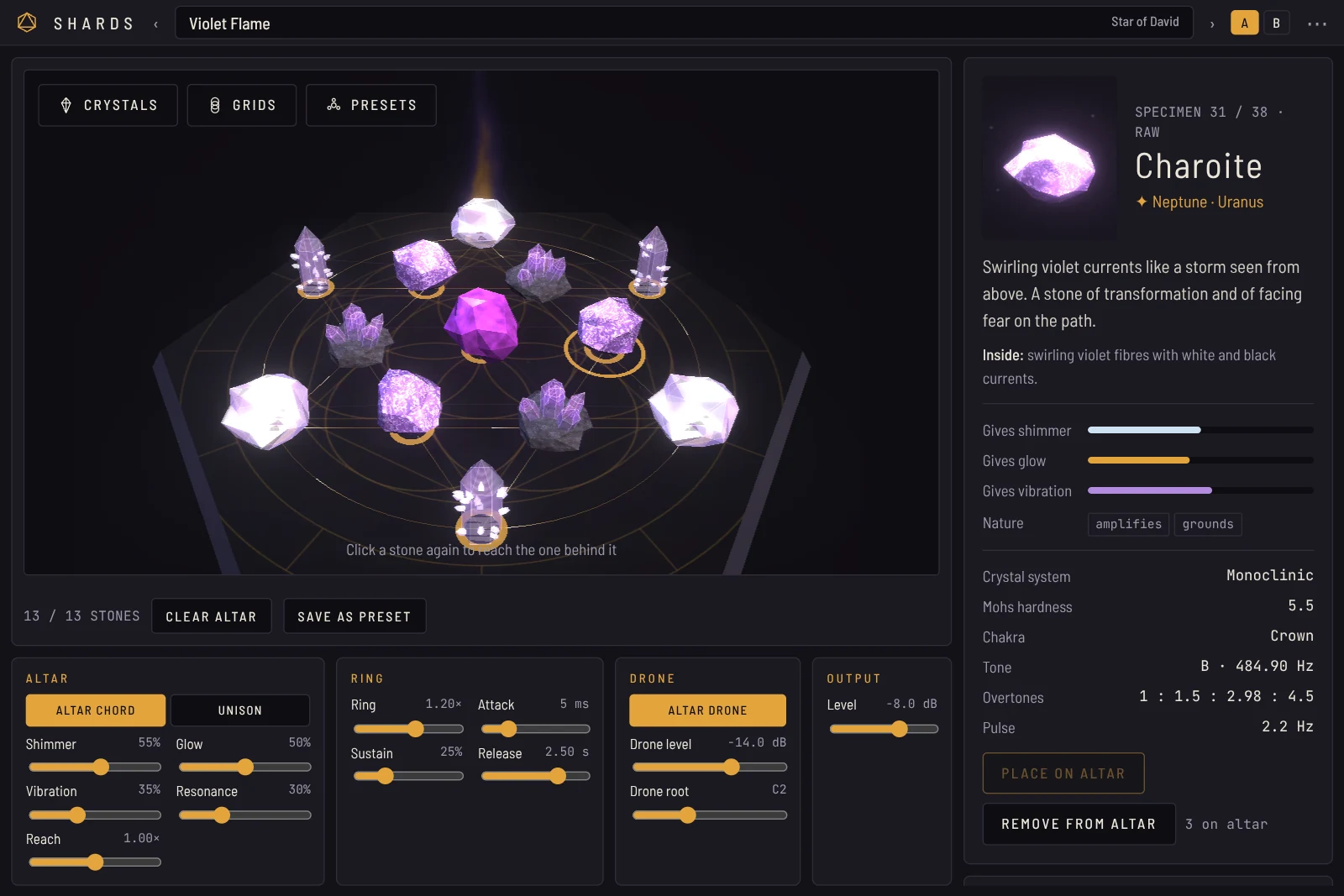
- 1Crystals: the 38 stones. Drag one onto the altar.
- 2Grids: sacred-geometry templates the stones snap to.
- 3Presets: the 29 ready-made grids and your own.
- 4The altar. Drag stones to move them. Click a stone to hear it.
- 5The flame rises behind the altar as the stones wake up.
- 6Stones on the altar, Clear altar and Save as preset.
- 7Altar: Mode, Shimmer, Glow, Vibration, Resonance, Reach.
- 8Ring: Ring, Attack, Sustain, Release.
- 9Drone: the altar as a held chord.
- 10Output: Level.
- 11Specimen: the selected stone, turning, with its celestial origin.
- 12Gifts: what this stone gives its neighbours.
- 13Place on altar and Remove from altar.
The altar
Placing and moving stones
Open Crystals and drag a stone onto the slab. It rings once as it lands. Up to 13 stones fit on the altar. Drag a stone on the slab to move it; it stops at the edge, so you can't push it off by accident.
When one stone stands in front of another, click again on the same spot to reach the one behind. A saffron ring on the slab marks the selected stone. You can also select any stone by its name in the Altar field list on the right.
To remove a stone, select it and press Remove from altar, then Yes, remove. Clear altar asks once more before it clears. After a remove or a clear, Undo puts the stones back where they were for 12 seconds.
The field
Every stone gives three things to the stones near it: shimmer, glow and vibration. A stone standing alone stays quiet. Bring stones together and they wake each other up: you see it in their light and hear it in the sound. A glowing thread joins stones close enough to touch.
Some stones change the field itself. Clear Quartz, Moldavite and Spirit Quartz amplify what their neighbours receive. Black Tourmaline, Shungite, Obsidian, Smoky Quartz and Gibeon ground them and calm their vibration. The Altar field list on the right shows each stone's shimmer, glow and vibration as you move them.
Reach sets how far each stone's field carries.
Grids
Open Grids and choose a template. Its lines are drawn on the slab, light flows along them, and each point has a ring where a stone can sit. With Snap stones to the grid points on, a stone you drop or drag jumps to the nearest free point.
| Grid | Points |
|---|---|
| Seed of Life | 7 |
| Flower of Life | 13 |
| Metatron's Cube | 13 |
| Tree of Life (10 sephiroth, 22 paths) | 10 |
| Vesica Piscis | 7 |
| Star of David | 13 |
| Pentagram | 11 |
| Triangle in Circle | 10 |
| Square & Cross | 13 |
| Chakra Column | 7 |
| Golden Spiral | 9 |
| Celestial Wheel | 13 |
| Infinity | 11 |
No grid places stones freely.
Sound
Every MIDI note rings all the stones on the altar. Each stone has a tone (the note of its chakra, root on C up to crown on B), four overtones from its crystal system and a ring time set by its hardness. On an empty altar Shards plays Clear Quartz.
| Control | What it does |
|---|---|
| Altar chord / Unison | Altar chord plays each stone at its own tone above the key you press. Unison plays every stone on the note you press and stacks their timbres. |
| Shimmer | A partial two octaves up on every stone, plus an octave-up shimmer delay. Both follow the altar's shimmer. |
| Glow | Warms the tone and opens the halo reverb. Follows the altar's glow. |
| Vibration | Each stone's tremolo, at its own pulse rate. Stones that receive more vibration pulse faster and deeper. |
| Resonance | Resonators tuned to the stones' tones ring with everything you play. |
| Reach | How far each stone's field carries on the altar. |
| Ring | Scales every stone's natural ring time, 0.25× to 4×. |
| Attack | Fade-in of each note, 1 ms to 2 s. |
| Sustain | 0 % rings like a struck bowl and fades. Higher values hold the note while the key is down, like a pad. |
| Release | Fade after you let go, 0.05 to 10 s. |
| Altar drone | Holds the whole altar as one chord at the drone root. It follows every stone you move and fades in over a few seconds. |
| Drone level, Drone root | The drone's level and its root note (C1 to C4). |
| Level | Output level, stored in presets. Output (host automation only) is not stored in presets. |
The mod wheel adds vibration. Pitch bend is ±2 semitones. The sustain pedal holds notes. Tones follow the suite's Reference tuning in Settings (A4 = 440, 432, 444 or 436 Hz).
Click a stone on the altar, or its name in the list, to hear it alone at its own tone.
Presets
The Presets tab lists the 29 ready-made grids. Choosing one lays out its stones and its geometry; Undo brings back the altar you had before. The same grids are in the Sacred Audio preset browser in the header and in your DAW's preset list.
| Group | Grids |
|---|---|
| Opening and balance | Deep Healing, Third Eye Opening, Awakening, Crown Opening, Chakra Alignment, Heart Opening, Emotional Release, Clear Voice, Calm Mind |
| Shield and ground | Grounding Shield, Shadow Work, Purification, Metatron's Shield |
| Fire and form | Abundance, Creative Fire, Solar Will, Manifestation, New Beginnings |
| Moon and love | Moon Rite, Dream Temple, Sacred Union, Divine Love, Infinity Flow |
| Stars and spirit | Starseed Contact, Tree of Life Ascent, Celestial Wheel, Angelic Contact, Violet Flame, Star Gate |
Save as preset stores your altar (every stone, where it stands and the grid) with all the sound settings. Your presets appear under Your presets in the Presets tab and in the preset browser.
The stones
| Group | Stones |
|---|---|
| Earth stones | Clear Quartz, Amethyst, Rose Quartz, Citrine, Smoky Quartz, Selenite, Black Tourmaline, Labradorite, Lapis Lazuli, Malachite, Obsidian, Moonstone, Carnelian, Tiger's Eye, Fluorite, Aventurine, Pyrite, Turquoise, Shungite |
| Angelic & aura | Angel Aura Quartz, Celestite, Angelite, Danburite |
| Pink & violet | Kunzite, Rhodochrosite, Morganite, Watermelon Tourmaline, Rhodonite, Lepidolite, Charoite, Sugilite, Ametrine, Spirit Quartz |
| From the stars | Moldavite, Libyan Desert Glass, Tektite, Pallasite Meteorite, Gibeon Meteorite |
Select a stone to see its celestial origin, its lore, what it holds inside, what it gives its neighbours, its crystal system, hardness, chakra, tone, overtones and pulse.
Tips
- Pads: Sustain 60 % or more, Attack 300 ms, Release 4 s, Altar drone on. Move a stone during the breakdown and the bed changes.
- Plucks: Sustain 0, Ring 0.6, a few hard stones (quartz, pyrite) close together for a bright, short strike.
- One big voice: Unison with a full Flower of Life grid.
- Sessions: lay a grid, turn on the Altar drone and let it ring with no MIDI at all.
Troubleshooting
- No sound: Shards is an instrument. Put it on a MIDI track and play notes, or turn on the Altar drone.
- The window is empty or black: Shards draws the altar with your Mac's graphics. Close and reopen the plug-in window. If it stays empty, write to support with your macOS version.
- It's quiet after 14 days, with gaps every minute: the trial has ended. Enter your licence key.